流的分类
文件流(基于硬盘,速度慢,名字里带File),缓冲流(走内存,速度快,名字里带Buffer)
字节流/字符流:In(Out)putStream,Reader/Writer
转换流:InputStreamReader/OutputStreamWriter
标准输入输出流
打印流:PrintSream,PrintWriter
数据流:DataInputStream,DataOutputStream
对象流:ObjectInputStream,ObjectOutputStream –涉及序列化/反序列化
随机存取文件流:RandomAccessFile(随机意思是人为可操控,而不是电脑随机)
File类
能新建,删除,重命名文件或目录,不能访问文件本身,常用方法如下
1 | //构造方法 |
2 | File newfile=new File("/testfprder/test.txt"); //相对路径(文件) |
3 | File newfile3=new File("/testfprder/aforder"); //相对路径(目录) |
4 | File newfile2=new File("/testfprder/","test.txt"); //父路径+文件名 |
5 | //获取信息 |
6 | newfile.getName() //获取文件或目录名 |
7 | newfile.getPath() //获取new的时候的路径 |
8 | newfile.getAbsolutePath() //获取绝对路径 |
9 | newfile.getAbsoluteFile() //返回一个用绝对路径new的File对象 |
10 | newfile.getParent() //返回父级路径 |
11 | newfile.renameTo(new File()) //重命名 |
12 | newfile.exists() //判断文件是否存在 |
13 | newfile.canRead() //是否可读(对应canWrite()是否可写) |
14 | newfile.isFile() //是否是文件(对应有isDerectory()是否是目录) |
15 | newfile.lastModified() //最后修改事件 |
16 | newfile.length() //文件长度 |
17 | //增删查 |
18 | newfile.createNewFile() //创建文件,需捕获异常 |
19 | newfile.delete() //删除文件 |
20 | newfile.mkdir() //创建目录(直接mkdirs()创建多层目录) |
21 | newfile.list() //列出所有目录下的文件/子目录(返回String[]类型) |
22 | newfile.listFiles() //同上,返回File[]类型数组 |
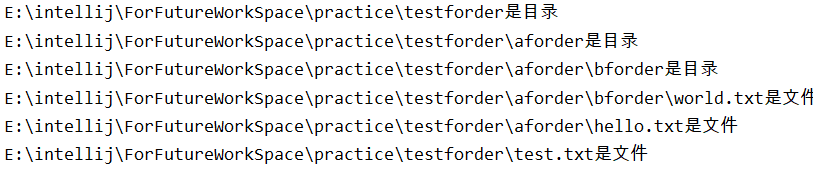
递归遍历文件目录
1 | public static void listAll(File file){ |
2 | if(file.isFile()){ |
3 | System.out.println(file.getAbsolutePath()+"是文件"); |
4 | }else { |
5 | System.out.println(file.getAbsolutePath()+"是目录"); |
6 | File[] fs=file.listFiles(); |
7 | if(fs!=null&&fs.length>0){ |
8 | for(File f:fs){ |
9 | listAll(f); |
10 | } |
11 | } |
12 | } |
13 | } |
IO流
字节流
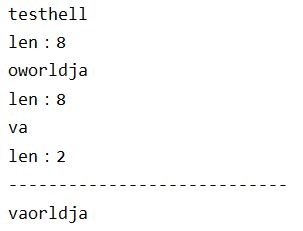
InputStream
1 | try { |
2 | FileInputStream fis = new FileInputStream("testforder/test.txt"); |
3 | byte[] bt=new byte[8]; //每次8个字节 |
4 | int len; |
5 | while ((len=fis.read(bt))!=-1){ //直到最后一个字节 |
6 | System.out.println(new String(bt,0,len)); |
7 | System.out.println("len:"+len); |
8 | } |
9 | System.out.println("----------------------------"); |
10 | System.out.println(new String(bt)); |
11 | fis.close(); |
12 | } catch (Exception e) { |
13 | e.printStackTrace(); |
14 | } |
OutputStream
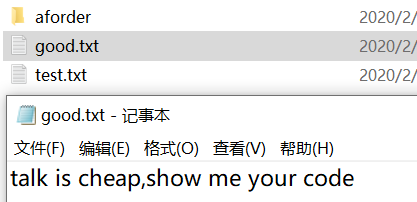
1 | try { |
2 | FileOutputStream fos = new FileOutputStream("testforder/good.txt"); |
3 | String str="talk is cheap,show me your code"; |
4 | fos.write(str.getBytes()); //写到内存 |
5 | fos.flush(); //刷新,将内存写入硬盘 |
6 | fos.close(); |
7 | } catch (Exception e) { |
8 | e.printStackTrace(); |
9 | } |
字节流复制文件
1 | public static void fileCopy(String inpath,String outPath){ |
2 | try { |
3 | FileInputStream fis = new FileInputStream(inpath); |
4 | FileOutputStream fos = new FileOutputStream(outPath); |
5 | byte[] bt=new byte[1024]; |
6 | int len; |
7 | while ((len=fis.read(bt))!=-1){ //读取文件 |
8 | fos.write(bt,0,len); //写入内存 |
9 | } |
10 | fos.flush(); //刷新 |
11 | fos.close(); //关闭流 |
12 | fis.close(); |
13 | } catch (IOException e) { |
14 | e.printStackTrace(); |
15 | } |
16 | } |
17 | //调用方法,传入参数 |
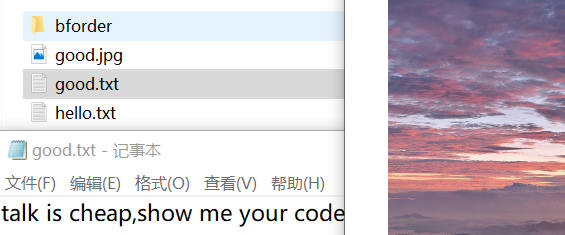
18 | fileCopy("testforder/good.txt","testforder/aforder/good.txt"); |
19 | fileCopy("testforder/beautiful.jpg","testforder/aforder/good.jpg"); |
字符流
与字节流差不多,不过针对字符,不像字节流可以操作所有类型文件(图片,压缩包,等等)
FileInputStream对应FileReader,FileOutputStream对应FileWriter
byte[] 字节数组对应char[] 字符数组
其他都一样
缓冲流
先把数据缓冲到内存中,然后在内存中进行io操作,速度快很多。
将File替换成Buffer即可,并要事先new FileInputStream()对象(输出流同理,注意flush)
1 | //构造方法 |
2 | FileInputStream fis=new FileInputStream("/testforder/test.txt"); |
3 | BufferInputStream bis=new BufferInputStream(fis); |
4 | ...... |
5 | bis.close(); |
6 | fis.close(); |
转换流
字节流与字符流互相转换,当字节流数据都是字符时,转换成字符流,提高效率
1 | FileInputStream fis=new FileInputStream("/testforder/test.txt"); |
2 | InputStreamReader isr=new InputStreamReader(fis,"utf-8"); |
3 | //接下来isr即可当Reader字符流使用,编码要与读取文件编码一致,记事本默认GBK |
4 | ...... |
5 | //一样的操作 |
数据流
Data替换File,构造方法与缓冲流类似,输出流输出到文件中不能直接辨认,是乱码,需要通过输入流读出来。
1 | readBoolean(),readInt(),readDouble() |
2 | writeBoolean(),wirteInt(),writeDouble() //方法一一对应 |
对象流
将对象转换成二进制进行网络传输
序列化:将对象写入IO流,
反序列化:从IO流中恢复成对象
需要对象实现Serializable接口(或者Externalizable,用的少)
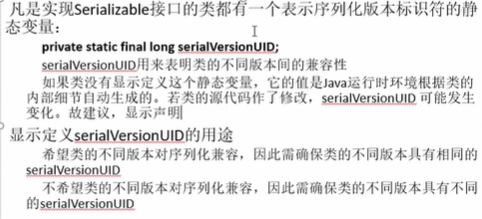
1 | //构建对象 |
2 | class Person implements Serializable { |
3 | private String name; |
4 | private int age; |
5 | } |
6 | //序列化 |
7 | public static void testSerialize (String path) throws Exception{ |
8 | ObjectOutputStream oos=new ObjectOutputStream(new FileOutputStream(path)); |
9 | Person p=new Person("jack",18); |
10 | System.out.println("序列化:"+p); |
11 | oos.writeObject(p); |
12 | oos.flush(); |
13 | oos.close(); |
14 | } |
15 | //反序列化 |
16 | public static void testDeserialize (String path) throws Exception{ |
17 | ObjectInputStream ois=new ObjectInputStream(new FileInputStream(path)); |
18 | Person p=(Person) ois.readObject(); |
19 | System.out.println("反序列化后:"+p); |
20 | ois.close(); |
21 | } |
22 | //测试 |
23 | public static void main(String[] args) { |
24 | try { |
25 | testSerialize("testforder/aforder/bforder/ohuo.txt"); |
26 | testDeserialize("testforder/aforder/bforder/ohuo.txt"); |
27 | } catch (Exception e) { |
28 | e.printStackTrace(); |
29 | } |
30 | } |
运行结果:文本中

控制台

注意:序列化和反序列化的类名,包名,结构必须完全一致。
随机存取流
省略。。。
总结
头发-1