SQL联合查询
环境准备
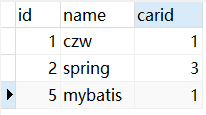
Person对象/表:id(Integer,主键),name(String),car(对象,表中为carid)
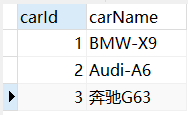
Car对象/表:carId(Integer,外键),carName
一个PersonMapper接口,一个getPersonById(int id)方法
准备好数据
| person | car |
|---|---|
 |
 |
情景一:查某人以及他买的车
SQL语句
1 | SELECT |
2 | p.id, |
3 | p.name, |
4 | p.car_id car_id, |
5 | c.car_name car_name |
6 | FROM |
7 | person p |
8 | LEFT JOIN car c ON p.car_id = c.car_id |
9 | WHERE |
10 | id=#{id} |
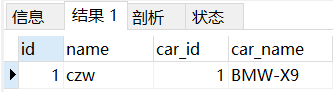
查询结果
映射文件
自定义封装规则:级联属性封装结果
1 | <resultMap id="pandc" type="com.czw.bean.Person"> |
2 | <id property="id" column="id"/> |
3 | <result property="name" column="name"/> |
4 | <result property="car.carId" column="car_id"/> |
5 | <result property="car.carName" column="car_name"/> |
6 | </resultMap> |
测试方法
1 | |
2 | |
3 | public void testPC(){ |
4 | SqlSession ss=sqlSessionFactory.openSession(true); |
5 | IPersonMapper pm=ss.getMapper(IPersonMapper.class); |
6 | Person person=pm.getPersonById(1); |
7 | System.out.println(person); |
8 | } |
结果完美

细节完善
使用MyBatis推荐的association标签封装复杂bean对象,property指定哪个元素是对象,javaType指定封装类型
1 | <association property="car" javaType="com.czw.bean.Car"> |
2 | <id property="carId" column="car_id"/> |
3 | <result property="carName" column="car_name"/> |
4 | </association> |
用这一段替换级联属性封装,测试同样成功
情景二:查买某种车的那批人
SQL语句
1 | SELECT |
2 | c.car_id, |
3 | c.car_name, |
4 | p.id person_id, |
5 | p.name person_name |
6 | FROM |
7 | car c |
8 | LEFT JOIN |
9 | person p ON c.car_id=p.car_id |
10 | WHERE |
11 | c.car_id = #{id} |
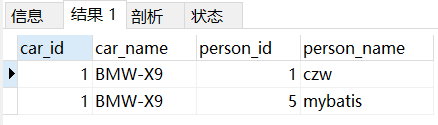
配置文件
使用collection标签:property指定哪个元素是集合,ofType:指定集合元素类型
1 | <resultMap id="listperson" type="com.czw.bean.Car"> |
2 | <id property="carId" column="car_id"/> |
3 | <result property="carName" column="car_name"/> |
4 | <collection property="persons" ofType="com.czw.bean.Person"> |
5 | <id property="id" column="person_id"/> |
6 | <result property="name" column="person_name"/> |
7 | </collection> |
8 | </resultMap> |
测试方法
1 | |
2 | |
3 | public void testCP(){ |
4 | SqlSession ss=sqlSessionFactory.openSession(true); |
5 | ICarMapper cm=ss.getMapper(ICarMapper.class); |
6 | Car car= cm.getCarById(1); |
7 | System.out.println(car); |
8 | List<Person> persons = car.getPersons(); |
9 | for (Person person:persons) { |
10 | System.out.println(person); |
11 | } |
12 | } |
结果同样完美

分步查询
情景一
SQL拆分
将表连接分为两个简单SQL语句查询,一个查person,一个查car,自定义封装时,在association标签里指定select的值为查car的select标签id(最好带上全类名),指定colume为要传入的参数,这样MyBatis就会自动去查car然后封装好。
CarMapper.xml
1 | <select id="getCarById2" resultType="com.czw.bean.Car"> |
2 | select * from car where car_id=#{carId} |
3 | </select> |
PersonMapper.xml
1 | <select id="getPersonById2" resultMap="pc2"> |
2 | select * from person where id=#{id} |
3 | </select> |
4 | |
5 | <resultMap id="pc2" type="com.czw.bean.Person"> |
6 | <id property="id" column="id"/> |
7 | <result property="name" column="name"/> |
8 | <association property="car" select="com.czw.mapper.ICarMapper.getCarById2" column="car_id"></association> |
9 | </resultMap> |
结果也成功了,只不过用了两句SQL。
这样有一个问题,就是不需要查car的时候,也会去查,这时候就要全局开启按需加载策略
细节优化
1 | <!-- 开启延时加载策略--> |
2 | <setting name="lazyLoadingEnabled" value="true"/> |
3 | <!-- 开启属性按需加载策略--> |
4 | <setting name="aggressiveLazyLoading" value="false"/> |
这样只有要用到时,才会用后置SQL的去查出信息,可以在association标签的fetchType属性设置为eager覆盖全局配置文件的懒加载,设为lazy相反
情景二
SQL拆分
一个根据car_id查出所有person的返回List的SQL
1 | <select id="getPersonByCarId" resultType="com.czw.bean.Person"> |
2 | select * from person where car_id=#{id} |
3 | </select> |
一个根据car_id查到car的SQL,后置调用上面那句
1 | <select id="getCarById22" resultMap="cp2"> |
2 | select * from car where car_id=#{carId} |
3 | </select> |
4 | <resultMap id="cp2" type="com.czw.bean.Car"> |
5 | <id property="carId" column="car_id"/> |
6 | <result property="carName" column="car_name"/> |
7 | <collection property="persons" select="com.czw.mapper.IPersonMapper.getPersonByCarId" column="car_id"></collection> |
8 | </resultMap> |
结局完美
综合分析
分步查询了解即可,推荐使用连接查询
动态SQL
简化SQL语句动态拼串
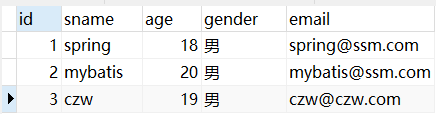
环境搭建
if标签
准备一个以Student对象为参数的方法,根据对象设置的属性进行动态拼接查询
1 | <select id="getStuBySome" resultMap="stuMap"> |
2 | select * from student where |
3 | <if test="age!=null"> |
4 | <!--age不为空时,添加age>=参数对象的年龄的条件--> |
5 | age >= #{age} and |
6 | </if> |
7 | <if test="!gender.equals('') and gender!=null"> |
8 | <!--gender不为空并不是空串时,添加gender=参数对象的性别的条件--> |
9 | gender = #{gender} |
10 | </if> |
11 | </select> |
测试方法
1 | |
2 | |
3 | public void testIF(){ |
4 | SqlSession ss=sqlSessionFactory.openSession(true); |
5 | IStudentMapper sm=ss.getMapper(IStudentMapper.class); |
6 | Student student=new Student(); |
7 | //student.setAge(19); |
8 | //这句不注释就会查出加了年龄限制的数据,实现了动态查询 |
9 | student.setGender("男"); |
10 | List<Student> studentList = sm.getStuBySome(student); |
11 | for (Student stu:studentList) { |
12 | System.out.println(stu); |
13 | } |
14 | } |
运行结果完美
注释时查到了所有性别为男的数据,不注释时查到了性别为男切年龄大于等于19的数据
where标签
上述SQL语句中,要是没有条件就会多出一个where来,要是没有最后一个条件,就会多出一个and来,所以将条件写在where标签中,并且将and写前面,MyBatis会自动去除前面的多余and,改成这样。
1 | <select id="getStuBySome" resultMap="stuMap"> |
2 | select * from student |
3 | <where> |
4 | <if test="age!=null"> |
5 | and age >= #{age} |
6 | </if> |
7 | <if test="!gender.equals('') and gender!=null"> |
8 | and gender = #{gender} |
9 | </if> |
10 | </where> |
11 | </select> |
当两个条件都写了时,MyBatis去除了age条件那个and,测试成功
trim标签
1 | <trim prefix="where" suffixOverrides="and"> |
2 | <if test="age!=null"> |
3 | age >= #{age} and |
4 | </if> |
5 | <if test="!gender.equals('') and gender!=null"> |
6 | gender = #{gender} and |
7 | </if> |
8 | </trim> |
同样不写where,用这个标签的prefix属性给下面这坨整体加一个where前缀,suffixOverrides可以将多余的后缀去除,这样可以去除后面的and,还有suffix加后缀,和prefixOverrides去除多余前缀,个人觉得还不如用where+and写前面。
foreach标签
当输入的参数是一个集合时,用这个标签
collection指定输入的集合名,item指定每一个元素,separator指定分隔符,open指定开始符,close指定结束符。
1 | <select id="getStuByIds" resultMap="stuMap"> |
2 | select * from student where id in |
3 | <foreach collection="ids" item="id" separator="," open="(" close=")"> |
4 | #{id} |
5 | </foreach> |
6 | </select> |
测试方法
1 | |
2 | |
3 | public void testFor(){ |
4 | SqlSession ss=sqlSessionFactory.openSession(true); |
5 | IStudentMapper sm=ss.getMapper(IStudentMapper.class); |
6 | List<Student> studentList = sm.getStuByIds(Arrays.asList(1,2)); |
7 | for (Student stu:studentList) { |
8 | System.out.println(stu); |
9 | } |
10 | } |
结果得到了id为1和2的student,完美
choose标签
分支选择,相当于if-else
1 | <select id="getStuByChoose" resultMap="stuMap"> |
2 | select * from student |
3 | <where> |
4 | <choose> |
5 | <when test="id!=null"> |
6 | id=#{id} |
7 | </when> |
8 | <when test="age!=null"> |
9 | age=#{age} |
10 | </when> |
11 | <when test="gender!=null and !gender.equals('')"> |
12 | gender=#{gender} |
13 | </when> |
14 | <otherwise> |
15 | 1=1 |
16 | </otherwise> |
17 | </choose> |
18 | </where> |
19 | </select> |
测试方法
1 | |
2 | |
3 | public void testChoose(){ |
4 | SqlSession ss=sqlSessionFactory.openSession(true); |
5 | IStudentMapper sm=ss.getMapper(IStudentMapper.class); |
6 | Student student=new Student(); |
7 | //student.setId(1);有id查id |
8 | //student.setAge(19);有年龄查年龄 |
9 | //student.setGender("男");有性别查性别 |
10 | //都没有全查出来 |
11 | List<Student> studentList = sm.getStuByChoose(student); |
12 | for (Student stu:studentList) { |
13 | System.out.println(stu); |
14 | } |
15 | } |
结果同样完美,在这里,与if标签不同的时,choose在满足第一个when的时候就不会继续看下面的,如果都不满足,就看otherwise
set标签
写在update里,替换原生uptade语句,与if结合使用,可以写强大的动态更新。set标签能自动去除多余的逗号,加上if标签有哪个字段就更新哪个字段。
1 | <update id="updateStu"> |
2 | update student |
3 | <set> |
4 | <if test="name!=null and !name.equals('')"> |
5 | sname=#{name}, |
6 | </if> |
7 | <if test="age!=null and age>0"> |
8 | age=#{age}, |
9 | </if> |
10 | <if test="gender!=null and !gender.equals('')"> |
11 | gender=#{gender}, |
12 | </if> |
13 | <if test="email!=null and !email.equals('')"> |
14 | email=#{email}, |
15 | </if> |
16 | </set> |
17 | <where> |
18 | id=#{id} |
19 | </where> |
20 | </update> |
测试方法
1 | |
2 | |
3 | public void testSet(){ |
4 | SqlSession ss=sqlSessionFactory.openSession(true); |
5 | IStudentMapper sm=ss.getMapper(IStudentMapper.class); |
6 | Student student=new Student(); |
7 | student.setId(3); |
8 | student.setAge(20); |
9 | student.setEmail("ccc@czw.com"); |
10 | System.out.println(student); |
11 | //student.setGender("男"); |
12 | sm.updateStu(student); |
13 | } |
结果完美,只更新了年龄和email
OGNL表达式
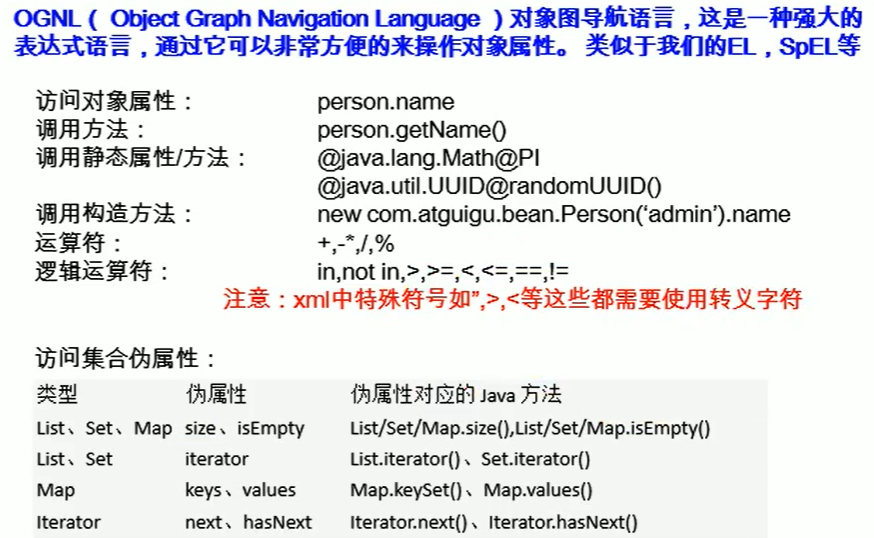
bind标签
将一个表达式的值到一个变量,不太好用
总结
头发-1